Overview
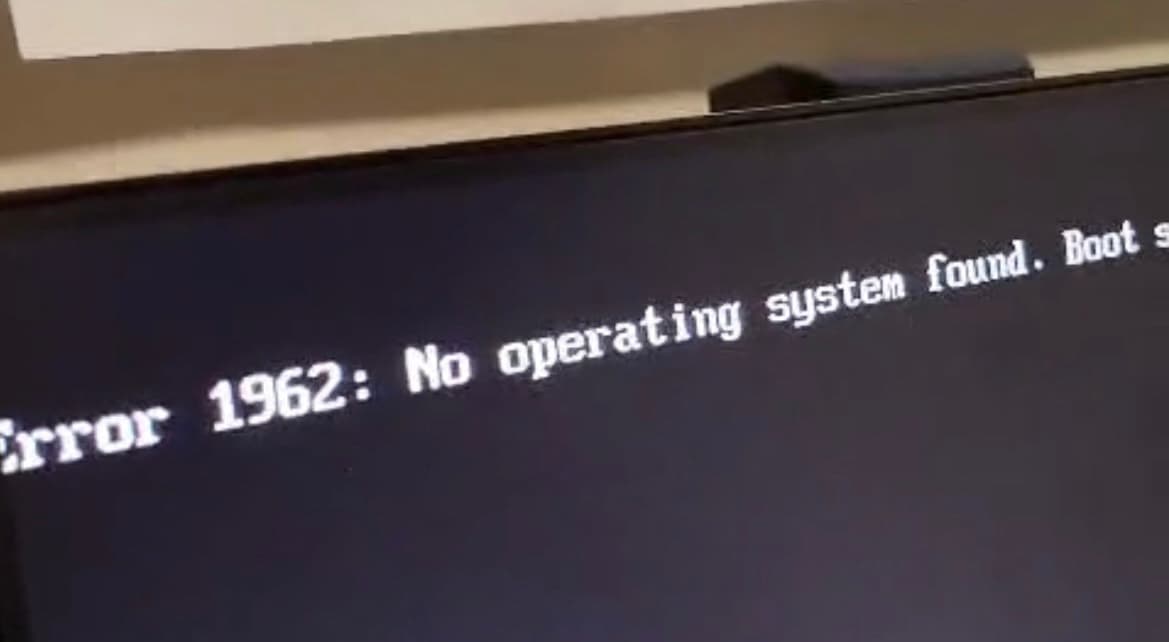
- Diagnosed BIOS state: Discovered the boot drive missing.
- Reconfigured firmware: Adjusted UEFI/Legacy boot order and CSM settings.
- Attempted repair: Ran Windows built-in tools (DISM, SFC) for OS recovery.
- Escalated response: When repair failed, created a bootable USB installer.
- Performed clean install: Reinstalled Windows 10, restored functionality, verified stability.
Key Features
-
BIOS investigation:
- Accessed BIOS Main and Devices tabs to confirm hardware presence.
- Startup tab revealed incorrect boot mode.
- Reconfigured UEFI/CSM settings and boot order.
-
Windows Recovery Environment:
- Used advanced boot options to reach WinRE.
- Attempted startup repair, Safe Mode, and advanced recovery options.
-
Command-line diagnostics:
- Executed System File Checker (SFC):
Bash
sfc /scannow - Attempted Deployment Imaging Servicing and Management (DISM):
Bash
DISM /Online /Cleanup-Image /RestoreHealth - Checked Windows Modules Installer service in Services.msc.
- Executed System File Checker (SFC):
-
OS Reinstallation via Bootable Media:
- Created bootable USB with Windows Media Creation Tool.
- Wiped corrupted partitions and reinstalled Windows 10 cleanly.
- Verified successful boot into the restored login screen.
Technologies Used
- Firmware & OS: BIOS/UEFI configuration, Windows 10, CSM boot.
- Recovery Tools: Windows Recovery Environment (WinRE), Startup Settings.
- Command-Line Utilities: DISM, SFC, services.msc.
- Boot Media: Windows Media Creation Tool, USB bootloader.
- Security Context: Malware suspicion, incident response mindset.
Challenges and Learnings
- BIOS detection issues: Initially the boot drive was not visible; required toggling UEFI/Legacy support.
- Windows repair failures: DISM and SFC could not restore integrity, forcing escalation.
- Recovery options missing: Default Reset this PC option was absent, highlighting the need for external media.
- Incident context: Root cause traced to suspected malware that damaged boot records.
- Step 1: Attempt least invasive fixes (BIOS, Safe Mode, DISM/SFC).
- Step 2: Escalate to reinstall if unrecoverable.
- Step 3: Validate system stability and re-enforce basic cyber hygiene.
Outcome
- System recovery: Fully restored functionality via Windows 10 reinstall.
- Skills demonstrated: BIOS troubleshooting, WinRE usage, DISM/SFC commands, clean OS installation.
- Recruiter value: This project simulates Tier 1–2 IT support, helpdesk escalation, and cyber incident response—diagnosing a compromised system, executing repairs, and knowing when to escalate to reinstall.
- Next steps:
- Add post-incident hardening (AV install, patching, firewall).
- Automate bootable USB creation with scripted tools.
- Document recovery SOPs for faster future response.